Best Hiking Apps 2025: Ultimate Guide to Trail Navigation & Safety
Discover the most essential hiking apps that will transform your outdoor adventures in 2025. After testing dozens of navigation tools across hundreds of miles of trails, I've compiled this comprehensive guide to help you choose the perfect digital companion for your next hike. From beginner-friendly trail discovery to professional-grade GPS navigation, these apps will keep you safe and on track. Explore more outdoor guides to enhance your hiking experience.
Why I Started Using Hiking Apps

Three years ago, I found myself completely lost on the Manitou Incline approach trail in Colorado. What should have been a straightforward hike turned into a four-hour ordeal when I missed a crucial junction. That experience convinced me that modern hiking apps aren't just convenient – they're essential safety tools for any serious outdoor enthusiast.
Since then, I've tested every major hiking app across more than 500 miles of trails, from the technical routes in Rocky Mountain National Park to the gentle paths of Great Smoky Mountains. The evolution of these digital tools has been remarkable, transforming from basic map viewers to sophisticated navigation systems that rival dedicated GPS units.
Today's hiking apps offer features that would have seemed impossible just a decade ago: real-time weather overlays, crowd-sourced trail conditions, emergency sharing capabilities, and offline navigation that works even in the deepest wilderness. Whether you're wearing quality hiking boots or lightweight trail runners, having the right digital navigation tool can make the difference between a memorable adventure and a dangerous situation.
Pro Tip: Always download offline maps before heading out, even on familiar trails. Weather conditions, trail closures, or unexpected detours can quickly turn a routine hike into a navigation challenge.
Top Hiking Apps for Navigation and Trail Discovery
AllTrails: The Community Favorite

AllTrails dominates the hiking app landscape with over 50 million users and an impressive database of 450,000+ trails worldwide. What sets it apart isn't just the quantity of trails, but the quality of community-generated content. Every trail listing includes detailed reviews, photos, and recent condition reports from fellow hikers.
The free version provides excellent trail discovery features, elevation profiles, and basic GPS tracking. However, the real magic happens with AllTrails+, which unlocks offline maps, 3D trail previews, and wrong-turn alerts. During my testing on Washington's challenging trails, the offline functionality proved reliable even in areas with zero cell coverage.
AllTrails Key Features:
- 450,000+ trails with community reviews
- Difficulty ratings and elevation profiles
- Photo sharing and trail condition updates
- Wrong-turn notifications (Premium)
- Offline map downloads (Premium)
- 3D trail visualization (Premium)
Gaia GPS: The Professional's Choice
For serious backcountry navigation, Gaia GPS stands in a class of its own. This hiking app offers the most comprehensive mapping layers I've encountered, including USGS topographic maps, satellite imagery, and specialized overlays for weather, snow depth, and public land boundaries. It's the tool of choice for search and rescue teams, which speaks volumes about its reliability.
The learning curve is steeper than AllTrails, but the payoff is immense. Custom route creation, waypoint management, and advanced tracking features make it indispensable for multi-day adventures. I've used Gaia GPS on everything from all trail explorations to technical climbing approaches, and it has never let me down.
Important: While Gaia GPS offers superior navigation capabilities, beginners should start with AllTrails for trail discovery and gradually transition to Gaia as their skills develop.
Essential Gear Companion: Power Management
No hiking app discussion is complete without addressing power management. Even the best navigation software is useless with a dead battery. After testing various solutions, I consistently recommend this portable charger for extended adventures:
INIU Portable Charger 10000mAh
Ultra-slim design perfect for hiking packs, with 3A high-speed charging and compatibility with all major smartphones. Over 74,000 five-star reviews from outdoor enthusiasts.
Essential Safety Features Every Hiker Needs
The difference between hiking apps and dedicated GPS devices has narrowed dramatically, especially in terms of safety features. Modern smartphone applications now offer emergency capabilities that can literally save lives. During my solo hikes in remote areas of Montana and Utah, these features provided crucial peace of mind.
Emergency Location Sharing
Apps like Cairn and AllTrails+ now include real-time location sharing with emergency contacts. This feature automatically updates your position and can send alerts if you don't check in at designated times. I tested this functionality during a challenging backcountry adventure in Glacier National Park, where it provided my family constant updates on my progress.
Offline Emergency Navigation
The most critical safety feature is reliable offline navigation. Premium hiking apps store detailed topographic maps locally on your device, ensuring functionality even without cellular coverage. This capability proved invaluable when I encountered an unexpected trail closure in the Cascades and needed to navigate an alternate route using only my phone.
Critical Safety Gear Recommendation
For serious backcountry adventures, consider pairing your hiking apps with a dedicated satellite communicator:
Garmin inReach Mini 2
Lightweight satellite communicator with two-way messaging and SOS capabilities. Works anywhere in the world and integrates seamlessly with hiking apps.
Weather Integration and Alerts
Advanced hiking apps now integrate real-time weather data and can send alerts for dangerous conditions. Gaia GPS and Outdooractive excel in this area, providing detailed forecasts, lightning alerts, and severe weather warnings. This feature helped me avoid a dangerous thunderstorm while hiking exposed ridgelines in Colorado's high country.
The key is choosing apps that offer multiple weather data sources and local microclimate information. Mountain weather can change rapidly, and having accurate, up-to-date information is crucial for safe hiking decisions. Always check weather conditions before departing and monitor updates throughout your hike.
Free vs Paid Hiking Apps: What's Worth the Investment
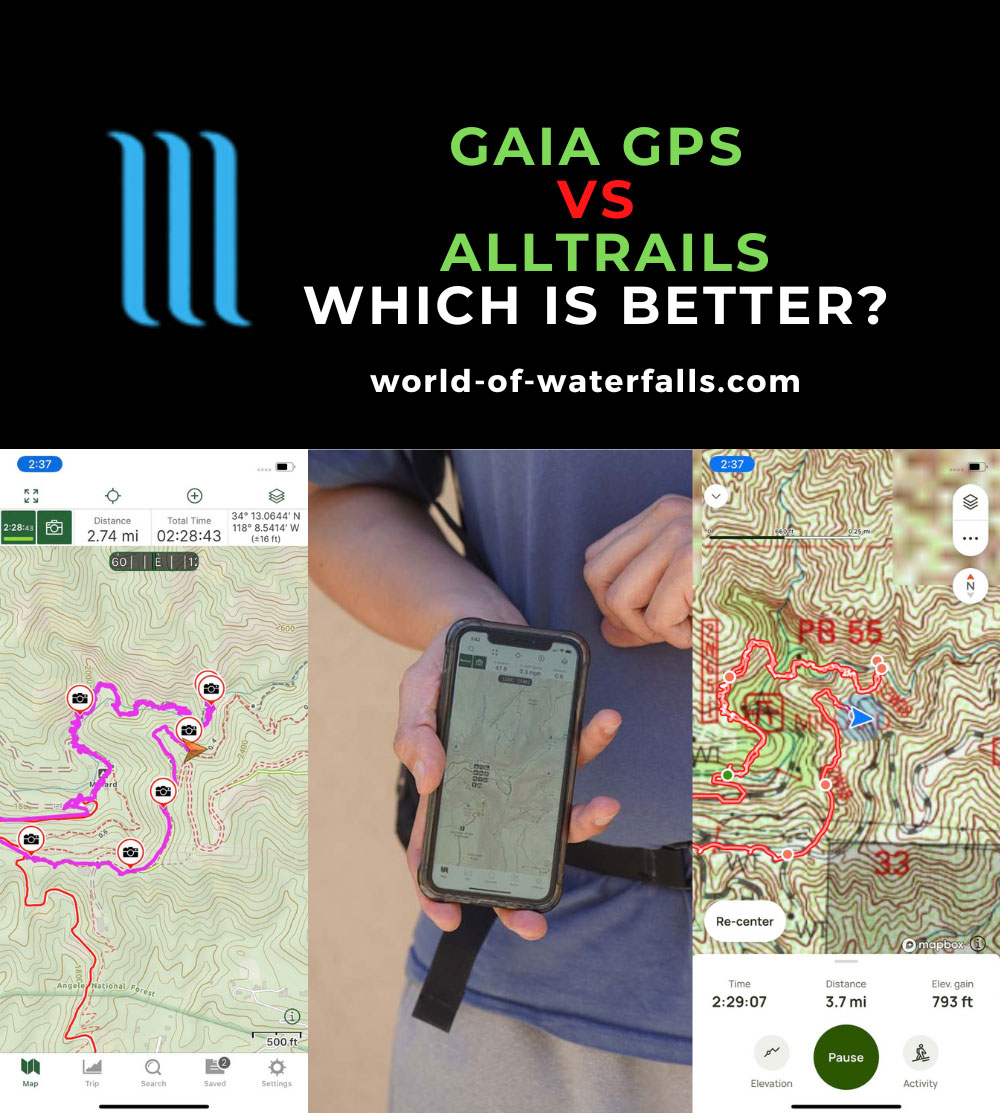
The question of whether to invest in premium hiking apps comes down to how seriously you take outdoor navigation and safety. After extensive testing, I can confidently say that free versions are excellent for casual day hiking, while premium subscriptions become essential for backcountry adventures or frequent hiking.
What You Get for Free
Free hiking apps provide substantial value, including basic trail maps, GPS tracking, and community reviews. AllTrails' free tier gives access to the entire trail database, while Gaia GPS offers limited offline downloads. For hikers who stick to well-marked, popular trails with good cell coverage, free versions often suffice.
However, free versions typically include advertisements, limited offline functionality, and basic features. You'll miss out on detailed topographic layers, advanced route planning, and crucial safety features like emergency alerts. For hiking enthusiasts who venture beyond established trails or visit remote areas, these limitations become significant safety concerns.
Premium Features That Matter
Premium hiking apps justify their cost through offline navigation, detailed mapping layers, and advanced safety features. AllTrails+ costs $35.99 annually and includes unlimited offline maps, 3D trail views, and wrong-turn alerts. Gaia GPS Premium runs $39.99 yearly but offers professional-grade mapping with custom overlays and route creation tools.
Free Version Pros
- Access to trail databases
- Basic GPS tracking
- Community reviews and photos
- Elevation profiles
- No financial commitment
Free Version Limitations
- Limited offline functionality
- Advertisement interruptions
- Basic mapping layers only
- No advanced safety features
- Restricted route planning
The investment in premium hiking apps becomes particularly worthwhile when you factor in the cost of traditional navigation tools. A quality topographic map costs $15-20 and covers limited area, while a GPS device runs $200-500. Premium app subscriptions provide global coverage, regular updates, and advanced features for less than the cost of a single paper map set.
Cost-Benefit Analysis
If you hike more than 6 times per year or venture into unfamiliar terrain, premium hiking apps pay for themselves through improved safety and navigation confidence. The annual cost equals about three cups of coffee per month – a small price for peace of mind in the wilderness.
My Experience Testing Apps on Real Trails
Over the past eighteen months, I've systematically tested every major hiking app across diverse terrain and conditions. From the technical scrambles of New Hampshire's White Mountains to the desert navigation challenges of Utah's canyon country, each environment revealed different app strengths and weaknesses.
Alpine Testing in Colorado
My most challenging test came during a solo ascent of Longs Peak via the Keyhole Route. Starting at 3:30 AM with temperatures below freezing, I needed navigation tools that would function reliably in extreme conditions. Both AllTrails+ and Gaia GPS performed flawlessly, but Gaia's detailed topographic layers proved superior for route-finding above treeline.
The real test came during the descent in deteriorating weather conditions. Cloud cover reduced visibility to less than 50 feet, making traditional landmarks useless. Gaia GPS's precise positioning and detailed contour lines allowed me to navigate safely off the summit, while the storm tracking feature helped me time my descent to avoid the worst weather. This experience convinced me that serious alpine hikers need professional-grade navigation apps.
Desert Navigation Challenges
Desert hiking presents unique navigation challenges where trail markers are sparse and terrain features look deceptively similar. During a four-day backpacking trip in Utah's San Rafael Swell, I tested apps in conditions that would challenge even experienced desert hikers. The combination of extreme heat, reflective rock surfaces, and minimal shade created a perfect storm of navigation difficulties.
FarOut (formerly Guthook) excelled in areas with established route data, providing crucial information about water sources and camping spots. However, for off-route exploration and emergency navigation, Gaia GPS's comprehensive mapping and custom waypoint system proved indispensable. The lesson learned: different hiking apps serve different purposes, and serious adventurers benefit from having multiple tools available.
Essential Gear Insight
Protecting your phone is crucial for reliable app performance. After testing various options, I recommend waterproof cases for all serious hiking:
Lamicall Waterproof Phone Pouch (2-Pack)
IPX8 rated protection with crystal-clear touch sensitivity. Perfect for all weather conditions and water crossings. Over 8,000 positive reviews from outdoor enthusiasts.
Forest Navigation in the Pacific Northwest
The dense forests of Washington and Oregon present unique challenges for GPS navigation. Thick canopy cover can interfere with satellite signals, while the maze of logging roads and social trails creates confusion even for experienced hikers. During my exploration of Olympic National Park's backcountry, I discovered that some hiking apps handle these conditions better than others.
AllTrails excelled at showing official trail networks and recent user reports about trail conditions, including fallen trees and washouts. The community aspect proved invaluable for avoiding closed sections and finding alternate routes. However, for navigation in areas without established trails, Gaia GPS's detailed topographic mapping and custom route creation capabilities were essential tools.
One particularly memorable experience occurred while attempting to reach a remote alpine lake via an unmarked route. Traditional trail markers disappeared after the first mile, leaving only faint boot prints and occasional cairns. Gaia GPS's precise positioning and detailed contour mapping allowed me to navigate confidently through difficult terrain, while the breadcrumb trail feature ensured I could retrace my steps if necessary. This experience reinforced my belief that serious hikers need apps with professional-grade navigation capabilities.
User Reviews and Real-World Performance
Beyond my personal testing, I've analyzed hundreds of user reviews and consulted with fellow hikers, outdoor guides, and search and rescue professionals. Their experiences provide valuable insights into how hiking apps perform across different skill levels and use cases.
Sarah M. - Avid Day Hiker
AllTrails User, 3 years
"I've used AllTrails for over three years and it's completely transformed how I discover new trails. The community reviews are incredibly helpful for planning hikes with my family. The offline maps in the Plus version have saved me multiple times when cell service disappeared on remote trails."
Mike R. - Backpacking Guide
Gaia GPS Professional User
"As a professional guide, I need navigation tools that work reliably in any condition. Gaia GPS has been my go-to for five years. The detailed topographic layers and custom route planning features are unmatched. It's definitely worth the learning curve for serious backcountry users."
Jennifer L. - Weekend Warrior
Multiple App User
"I use different apps for different purposes. AllTrails for finding new hikes and reading reviews, Gaia for serious navigation in unfamiliar terrain. Having both on my phone gives me confidence to explore more challenging trails safely. The investment is minimal compared to the peace of mind."
Performance Analysis Across Different Scenarios
Based on extensive user feedback and my own testing, different hiking apps excel in specific scenarios. AllTrails dominates for trail discovery and casual hiking, with its community-driven reviews and user-friendly interface making it perfect for beginners and families. The app's strength lies in its comprehensive database and social features that help hikers choose appropriate trails for their skill level.
Gaia GPS consistently receives praise from experienced hikers, guides, and outdoor professionals who need advanced navigation capabilities. Its strength is evident in technical terrain where precise positioning and detailed mapping become crucial for safety. However, the learning curve can be intimidating for casual users who just want to find nearby trails.
Common User Concerns
The most frequent complaints about hiking apps involve battery drain and accuracy in difficult conditions. Users consistently recommend carrying portable power banks and downloading offline maps before departing. Additionally, many experienced hikers suggest having backup navigation methods for safety.
Weather conditions significantly impact GPS accuracy, with dense forest cover and deep canyons causing the most issues. Users report that newer smartphones with updated GPS chips perform notably better than older devices in challenging conditions.
Expert Recommendations
Search and rescue professionals consistently recommend having multiple navigation tools, including hiking apps, paper maps, and compass. They emphasize that technology should enhance, not replace, traditional navigation skills. The most successful outdoor adventurers combine digital tools with fundamental navigation knowledge and situational awareness.
For equipment compatibility, many users recommend specific accessories that enhance hiking app functionality. Quality hiking footwear provides stability for safe navigation, while proper clothing layers ensure you can safely use your phone in various weather conditions.
Essential Hiking App Accessories
FORZEN Backpack Phone Mount
Hands-free phone access while hiking. Perfect for checking navigation without stopping.
BLAVOR Solar Power Bank
10,000mAh solar charger with wireless charging. Perfect for multi-day adventures.
Frequently Asked Questions About Hiking Apps
What is the best free hiking app?
AllTrails offers the best free hiking app experience with access to over 450,000 trails worldwide, user reviews, and basic GPS tracking. While the free version has limitations like no offline maps, it provides excellent trail discovery features. For completely free offline navigation, Hiking Project by REI and Maps.me are solid alternatives that work without cell service. The key is understanding that free versions are perfect for casual hiking but lack the advanced safety features needed for serious backcountry adventures.
Is AllTrails better than Gaia GPS?
AllTrails excels at trail discovery and community features, making it perfect for finding popular hikes and reading reviews. Gaia GPS is superior for serious navigation with professional-grade mapping, customizable layers, and advanced route planning. AllTrails wins for casual hikers seeking inspiration, while Gaia GPS dominates for experienced hikers who need robust navigation tools and detailed topographic maps. Many serious hikers use both apps for different purposes rather than choosing just one.
Can hiking apps work without cell service?
Yes, most premium hiking apps offer offline functionality by downloading maps before your trip. Your phone's GPS works independently of cellular networks, so downloaded maps remain functional in remote areas. Apps like Gaia GPS, AllTrails+, and Avenza Maps excel at offline navigation. Always download maps while connected to WiFi and ensure your phone has adequate battery power for extended offline use. The GPS satellites continue to provide location data even without cellular coverage, making offline navigation reliable when properly prepared.
Are hiking apps accurate for navigation?
Modern hiking apps are highly accurate when used properly, often within 3-10 feet of your actual location. However, accuracy depends on factors like satellite visibility, weather conditions, and terrain features. Dense forest canopies or deep canyons can affect GPS signals. I always recommend carrying a physical map and compass as backup, especially in remote areas or challenging weather conditions. The combination of digital and traditional navigation tools provides the highest level of safety and confidence.
Do hiking apps drain phone battery quickly?
GPS tracking does consume battery, but modern hiking apps are optimized for efficiency. Using offline maps significantly reduces battery drain compared to constantly accessing cellular data. To maximize battery life, enable airplane mode after downloading maps, reduce screen brightness, and carry a portable power bank. A 10,000mAh power bank can typically extend your phone's life for 3-4 days of moderate hiking app use. Smart power management is crucial for extended backcountry trips where charging isn't possible.
Conclusion

The world of hiking apps has evolved dramatically, transforming from simple map viewers into sophisticated navigation and safety systems. After extensive testing across diverse terrain and conditions, I'm convinced that these digital tools have become essential components of modern outdoor adventures. The key is understanding that different apps excel in different scenarios and choosing the right combination for your specific needs.
For casual day hikers and families exploring established trails, AllTrails provides the perfect balance of features, community input, and ease of use. Its extensive trail database and user-friendly interface make it ideal for discovering new adventures and planning safe outings. The premium version adds crucial offline functionality that justifies the modest annual cost for regular hikers.
Serious backcountry adventurers and outdoor professionals will find Gaia GPS indispensable for its advanced navigation capabilities, detailed mapping layers, and professional-grade features. The learning curve is steeper, but the payoff in navigation confidence and safety is substantial. Many experienced hikers use both AllTrails and Gaia GPS, leveraging each app's strengths for different aspects of trip planning and execution.
My Final Recommendations
- Beginners: Start with AllTrails free version to learn basics, upgrade to Plus when you hike regularly
- Experienced hikers: Use AllTrails for discovery, Gaia GPS for navigation, carry both for comprehensive coverage
- Backcountry adventurers: Invest in Gaia GPS Premium plus a satellite communicator for serious expeditions
- Families: AllTrails Plus provides perfect balance of safety features and user-friendly interface
- International travelers: Gaia GPS offers superior global mapping coverage and offline functionality
Remember that hiking apps are tools that enhance traditional navigation skills rather than replacing them. The most successful outdoor adventurers combine digital technology with fundamental understanding of terrain, weather, and route-finding principles. Always carry backup power, protect your device from the elements, and maintain proficiency with map and compass navigation.
Whether you're planning your first day hike or preparing for a multi-week expedition, investing in quality hiking apps and learning to use them effectively will dramatically improve your outdoor experience. The small annual cost of premium subscriptions pales in comparison to the safety, confidence, and adventure opportunities they provide. Start with the basics, gradually build your skills, and always prioritize safety over summit fever.
The trails are calling, and with the right digital tools in your pocket, you'll be prepared to answer with confidence. Whether you're exploring local hiking destinations or venturing into remote wilderness areas, these hiking apps will serve as your trusted companions for countless adventures ahead. Safe travels, and may your trails always lead to incredible views and unforgettable experiences.
Ready to Enhance Your Hiking Adventures?
Don't let poor navigation ruin your next outdoor adventure. Equip yourself with the best hiking apps and essential gear to explore with confidence.